


Wansview Cloud
4.43.90K Reviews
App Specs
- Version
- 2.0.26080602
- Updated On
- License
- Free
- Downloads
- 1,000,000+
- Developer
- AJCLOUD INTERNATIONAL INC.
- Categories
- Lifestyle
- Platform
- Android, iOS
Screenshots
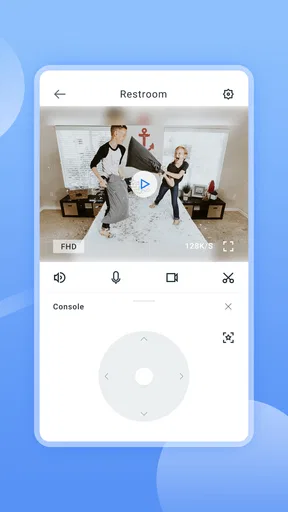
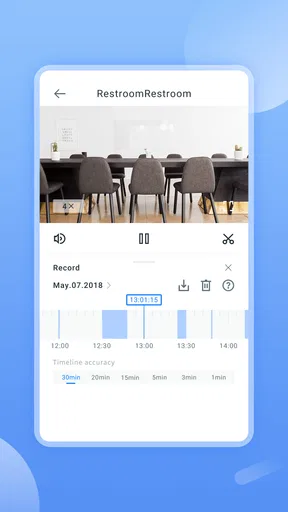
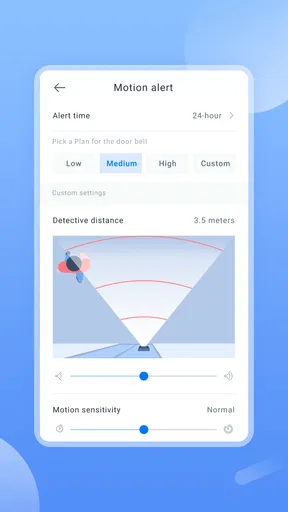
 Analysis by AppCompare
I judge a home camera app less by how many controls it offers than by how quickly I can answer a simple question: is everything all right at home? Wansview Cloud is a lifestyle app from AJCLOUD INTERNATIONAL INC. for viewing compatible Wansview cameras on a phone. Its appeal is direct: open the app, choose a camera, and check in remotely. That can be useful when you are away for the day, though the experience naturally depends on having a compatible camera and a working connection.
What to expect when you open a camera
The first useful distinction is between the speed of the app itself and the speed of the whole camera connection. A tap in the app may be quick, but live viewing also relies on the camera, your home network, and the connection on the phone you are using. I would treat remote viewing as a convenient check-in, not as an instant, guaranteed feed in every situation. If the picture takes a moment to appear, checking whether the camera is online and whether your phone has a steady connection is more useful than repeatedly tapping the same control.
That distinction matters most when you are in a hurry. If you are checking whether a pet is in its usual spot or whether a room is empty, a short wait may be acceptable. If you need a dependable immediate response to an urgent situation, a phone app and camera should not be your only plan. The value here is everyday visibility, rather than a promise that every view will load at once.
Real-life checks that make remote viewing worthwhile
A practical routine is to use a camera view for a specific question, then close it rather than leaving video running in the background. For example, when I am already out and wonder whether I shut an interior door, a quick look at a camera pointed toward that area could settle the question without asking someone else to go check. A camera placed to show an entryway can also help me understand whether a delivery has arrived, provided the view actually covers the spot I care about.
Placement is more important than it may seem. Before relying on a view, I would check from the app that the camera shows the intended area in both daylight and the lighting conditions I expect at night. A camera aimed too wide may make a room easy to recognize but leave important details small; a tighter view can show more detail while missing activity just outside the frame. I would also avoid pointing it at a bright window if that makes the rest of the room difficult to see.
For a household with more than one camera, naming each view clearly is a small habit with a real payoff. Labels such as “front entry” or “living room” are easier to scan than room names that mean something only to one person. If another household member may need to check a camera, agreeing on those labels beforehand can prevent a rushed search through several similar views.
When alerts help, and when they become noise
Motion alerts can make a camera more useful when you cannot keep checking the live view, but sensitivity is a trade-off. A setting that catches more movement can also draw attention to harmless activity. I would start with a moderate level and observe what triggers alerts during ordinary conditions before making it more sensitive. If notifications arrive constantly while nobody is concerned, they soon become easy to ignore, which undermines their purpose.
Worth Reading Before You Choose

EA SPORTS FC Mobile 26 Is a Bigger Football Game, but It Takes Time

Flipboard Shows What News Apps Must Do Beyond the Feed

Switching to Android Auto Means Rethinking Your Driving Routine

Google Calendar Makes a Crowded Week Easier to Manage

Ludo King Makes the Most of the Minutes Between Plans

Baby Panda World Brings Quick Play to Modern Phones, but Its Game Library Feels Busy
It helps to think about the camera’s location before adjusting sensitivity. A view that includes a busy walkway, moving curtains, or changing light may generate more distractions than a view of a quieter entrance. If the app’s alert controls let you tune how readily movement is detected, make one adjustment at a time and judge it over a normal day. That makes it easier to tell whether the change improved the signal or simply changed how often the phone buzzes.
Notifications are most useful when they prompt a sensible follow-up rather than replace one. An alert can tell you to open the camera view, but it cannot establish by itself why movement happened. I would avoid treating every notification as proof of a problem, and I would not rely on alerts as the sole safeguard for a home, a child, or an older relative. They are a convenient cue, not a substitute for judgement or a proper emergency plan.
Using Wansview Cloud day to day
I find that the most useful way to approach Wansview Cloud is to make each check purposeful: decide what you need to see, open the relevant camera, then return to your day. That keeps remote viewing practical rather than turning it into a habit of constantly refreshing a feed. I’d also use a quiet moment at home to learn which camera view answers each common question, so checking in later feels straightforward.
Getting Started with Wansview Cloud
First things first, setting up Wansview Cloud is a breeze. Once you’ve downloaded the app from the App Store or Google Play, you’ll be guided through the setup process. Trust me, even if you’re not super tech-savvy, you’ll find the instructions straightforward and easy to follow. The app connects to your home Wi-Fi network, and soon enough, you’ll be ready to start monitoring your space.
Features That Stand Out
Let’s talk about what makes this app so handy. One feature I particularly love is the real-time video streaming. You can check in on any room in your house with a simple tap on your phone. The video quality is surprisingly crisp, even in low-light conditions, thanks to the infrared night vision.
Another cool feature is the two-way audio. This means you can hear what’s going on and even talk back through the app. I found this especially useful for chatting with family members or scaring off any unwanted visitors. Just imagine the look on their faces when they hear a voice coming from nowhere!
Staying in the Loop
The app also offers motion detection alerts. You can customize the sensitivity, so you’re not bombarded with notifications every time a leaf blows past. When motion is detected, the app sends a push notification straight to your phone. It’s like having a personal security guard watching over your home.
And if you’re worried about missing anything important, the app provides cloud storage options. You can review and download footage at your convenience, which is great for keeping track of events or just ensuring everything is in order.
Making sense of recordings and audio
Recorded footage is most valuable when you know what you want to find. If an alert comes in, I would note roughly when it arrived and review the matching period rather than scrolling aimlessly through a long stretch of video. A short check around the event can provide context: whether someone entered the room, whether a pet passed by, or whether the movement was something ordinary. Downloading a clip can be useful when you need to keep a particular moment handy, but I would make sure I understand how the app’s available storage options work before depending on a recording for an important purpose.
Two-way audio is a different kind of tool from simply watching. It can be handy for calling a family member in another room or getting a pet’s attention, but I would test it when I am at home first. That lets me learn how loud the speaker sounds and how clearly my voice comes through in the room. It also avoids the awkwardness of expecting a quiet, private exchange through a camera that may be audible to others nearby.
For a visitor or delivery worker, speaking through a camera may help in a simple situation, but I would not assume it replaces answering the door or making a direct phone call. The camera’s placement, room noise, and network connection all affect the exchange. I would use audio as a convenient option when it makes sense, not as the only way to communicate something important.
User Experience
Overall, the user interface is intuitive and user-friendly. Everything is laid out clearly, and you don’t need to hunt around to find the features you need. The app supports multiple cameras, allowing you to keep an eye on different areas simultaneously. I found switching between camera views to be smooth and lag-free.
Also, if you ever run into issues, the app’s customer support is just a click away. They’re responsive and helpful, making sure you can get back to monitoring in no time.
Reliability, interruptions, and practical recovery
A camera app is only reassuring if I can recover calmly when a view does not load. I would first check the basics: whether the phone can reach the internet, whether the camera has power, and whether the home Wi-Fi is working. If other internet services are also slow on the phone, the problem may be the connection rather than the app. If only one camera is unavailable, checking that camera and its network coverage is a more targeted next step.
When a connection drops, restarting the app may be a reasonable first try, but I would avoid changing several settings at once. A simple sequence—check the phone connection, check the camera’s power and Wi-Fi, then reopen the camera view—makes it easier to see what actually fixed the issue. If the camera has been moved or the home network has changed, revisiting its connection setup may be necessary. That is more useful than assuming a viewing problem means the camera has failed.
For everyday peace of mind, a quick test before leaving home is a sensible habit: open each important camera, confirm that the view is current, and make sure alerts are set to a level you can live with. This does not guarantee uninterrupted monitoring, but it can reveal a disconnected camera before you are relying on it from somewhere else. I would also keep another way to contact a family member or neighbor for situations where a live view is unavailable.
Who will get the most from it
This app is best suited to someone who already uses compatible Wansview cameras and wants a phone-based way to check familiar spaces. It makes sense for a person who travels to work, a pet owner who wants occasional visual check-ins, or a household that wants to see more than one camera without switching between unrelated tools. The free price makes trying the app less of a commitment, though using the app still depends on owning suitable camera equipment and having a usable network.
It is less compelling if you have cameras from several brands and want one central app to manage them all. In that case, the camera maker’s ecosystem may feel restrictive compared with a platform designed to combine different devices. It is also not the right fit for someone who wants a camera-independent smart-home hub, or who needs professional monitoring and a guaranteed response to alerts. Wansview Cloud is a companion for Wansview cameras, not a replacement for every part of a broader security setup.
Compared with checking a camera through a web page or a general smart-home app, a dedicated camera app can keep the viewing and camera-specific controls in one place. The trade-off is that you are choosing the manufacturer’s approach rather than a universal system. I would favor this app when the cameras are already part of the home and straightforward remote viewing is the goal; I would compare alternatives first if cross-brand control, a wider smart-home routine, or a separate professional service matters more.
Compatibility, age, and ongoing use
On Android, the stated minimum operating system is Android 7.0, so an older phone should be checked before installation. The app is rated for Everyone, which describes its content rating rather than making it a children’s entertainment app; its purpose is monitoring compatible cameras. Its current version is 2.0.26050906, and it was released on Aug 22, 2018. I would keep the app and phone software reasonably current, especially for a tool used to check a home remotely.
Interest in the app is established: it has more than a million installs, an average rating of 4.3 from around 41 thousand ratings, and roughly 3.8 thousand written reviews. Those figures are useful context, but they cannot tell me whether a particular camera will connect well in a particular home. I would still test the camera from the exact rooms and networks where I plan to use it, because walls, router placement, and mobile coverage make a practical difference.
The app is free, which is useful when deciding whether it fits your routine, but I would distinguish the app’s price from any camera or cloud-storage costs. Before making cloud recording central to your setup, check the options presented for your camera and decide whether live viewing alone is enough. That small decision can prevent disappointment if your needs are mainly occasional check-ins rather than retaining footage over time.
Why You Might Love It
If you’re someone who values security and wants the convenience of monitoring your home from your smartphone, then Wansview Cloud is a solid choice. It’s perfect for busy individuals who need to keep an eye on things without being tied to a traditional security system.
Plus, the app receives regular updates, ensuring you have access to the latest features and security enhancements. It’s clear that the developers are committed to providing a top-notch experience.
In conclusion, Wansview Cloud is a versatile app that offers peace of mind with its robust features and ease of use. Whether you’re tech-savvy or just looking for a straightforward solution, this app is worth checking out. So go ahead, download it, and see for yourself how it transforms your home security experience.
My performance verdict
My overall view is that this is a practical, camera-centered app rather than a complete home-security system. Its usefulness comes from having live views, motion alerts, audio, and recordings together for compatible cameras. The most important performance lesson is to judge the whole setup, not just the app: camera placement, Wi-Fi reliability, and the phone’s connection shape whether a check feels immediate and dependable.
I would recommend it to a Wansview camera owner who wants occasional remote visibility and is willing to tune alerts and test the setup at home. I would look elsewhere if I needed a unified dashboard for mixed camera brands, guaranteed uninterrupted monitoring, or a professional response service. Used with realistic expectations and a simple backup plan, it can make everyday checks easier without asking you to treat a phone screen as a security guarantee.
Pros
- User-friendly interface for easy navigation.
- High-quality video streaming and recording.
- Supports multiple camera connections.
- Customizable motion detection settings.
- Real-time alerts via push notifications.
Cons
- Limited storage options without subscription.
- Occasional connectivity issues reported.
- Subscription required for advanced features.
- No integration with third-party smart devices.
- App updates can be infrequent.
FAQs for Wansview Cloud
What is Wansview Cloud and how does it work?
Wansview Cloud is a mobile application designed for remote video surveillance. It allows users to connect with Wansview security cameras to monitor live feeds, playback recorded footage, and receive motion alerts. Through the app, you can manage multiple cameras, ensuring your home or office is secure from anywhere, provided you have an internet connection.
Is Wansview Cloud compatible with all Wansview cameras?
Wansview Cloud is compatible with most Wansview camera models, but it's always best to check specific compatibility on the app’s official website or store page. The app supports both indoor and outdoor cameras, providing flexibility based on your security needs. Ensure your camera’s firmware is up to date for optimal performance.
What are the main features of Wansview Cloud?
Wansview Cloud offers features like real-time video streaming, two-way audio, motion detection alerts, and cloud storage for video recordings. The app also allows for easy sharing of video feeds with family members or colleagues, making it a comprehensive solution for both personal and professional use.
How secure is the data on Wansview Cloud?
Data security is a top priority for Wansview Cloud. The app uses encryption protocols to protect your video streams and recordings. Additionally, users can enable two-factor authentication for added security. Always ensure your app and camera firmware are updated to the latest versions to safeguard against vulnerabilities.
Are there any subscription fees for using Wansview Cloud?
While the app itself is free to download, Wansview Cloud offers subscription plans for additional services such as extended cloud storage. Free users can access basic features, but premium plans provide more storage options and advanced functionalities. The choice of subscription depends on your specific security needs and budget.


